Examples [WIP]
Example scripts (SyConn/examples/) for processing 3D electron
microscope (EM) data. Example data are available upon request.
The example data content
The folder contains an exemplary 3D EM data. One dataset can be provided upon request: cube1 of size 400 x 400 x 600
data1contains:h5 files that store raw data (
raw.h5) and segmentation information about cells (seg.h5) and other cellular organelles like mitochondria (mi.h5), synaptic junctions (sj.h5), vesicle clouds (vc.h5), symmetric and asymmetric synapses (sym.h5andasym.h5, respectively). Each cell and cell component has its id greater than zero. The id of the background (membranes and intracellular spaces) is 0.rag.bz2andneuron_rag.bz2files contain lists of edges of Resource Allocation Graph (RAG) that describes the neurons structure.
models- folder with pretrained Convolutional Neural Network models to detect cell types, glia, myelins, spines, synapses types etc.
Prerequisites
The following data should be located in in the current directory when executing
start.py, they will be copied to the working_directory if they are not
there yet:
models
data1
Command line arguments
--working_dir- can be given as a command line argument or defined by the user inside the script.--example_cube- integer: 1
Basic parameters
scalenumpy array; voxel size in nano metersprior_astrocyte_removalbooleanchunk_sizetouple; size of a cube that is processed by a single workern_folders_fsandn_folders_fs_scnumber of folders in the folder structure to create a hierarchy for storing information about cells and subcellular elementsexperiment_name; stringEach working directory has its own
config.ymlfile that stores dataset specific parameters (for more detailed information see config). To add further parameters to theconfig.ymlfile, they have to be specified in thekey_val_pairs_conflist of tuples, here:pyopengl_platform: string, possible ‘egl’ …batch_proc_system: string, possible ‘SLURM’,…prior_astrocyte_removal: booleanncores_per_node,ngpus_per_node,nnodes_total: intigers
bbnumpy array; min and max coordinates of the cube of interest will be fetched from the annotation file;offsetnumpy arraybdnumpy array; effectively dimensions of the cube of interest
Logging
For the example run a convenient system of log files is provided.
There is created one main log file for the whole run and other for
subsequent steps of the pipeline.
All log files are located in log folder inside working directory.
Initialize data
Data in the form of h5 files have to be converted into knossos datasets. For more information about knossos data format check KNOSSOS
Start SyConn
Data processing is divided into nine steps that have to be run subsequently.
Remark
The transform functions will be applied when loading the segmentation
data of cell organelles in order to convert them into binary fore- and
background currently using dill package to support lambda expressions.
Make sure all dependencies within the lambda expressions are imported
in batchjob_object_segmentation.py (here: numpy).
Prediction examples
This section introduces minimal examples for parts of SyConn. The corresponding python scripts
can be found in SyConn/examples/.
Semantic segmentation of spines
python script:
SyConn/examples/semseg_spine.pyrequires model folder in working directory

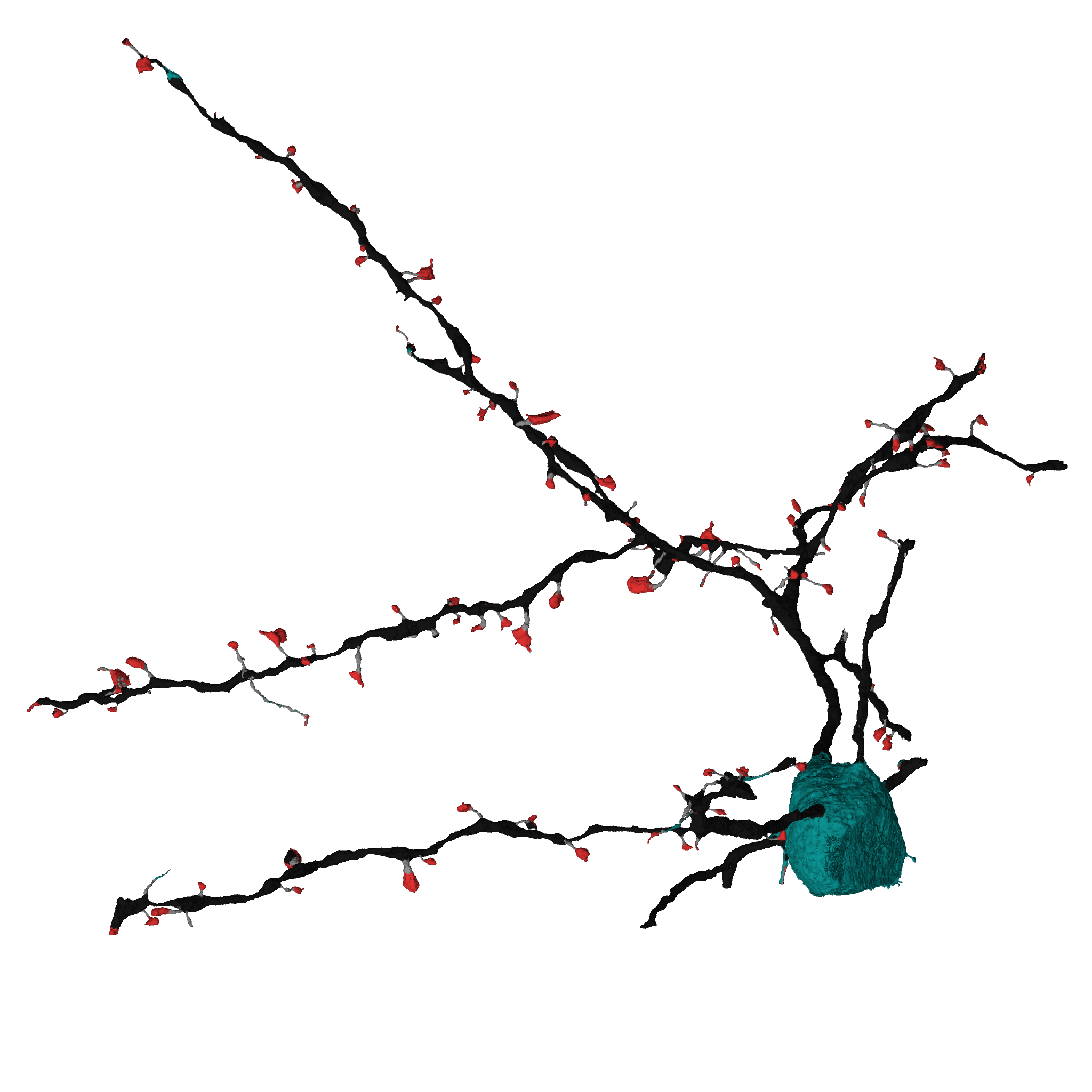 The script needs to be called with at least the `--kzip` argument to specify the location of the
file which contains the cell reconstruction.
If your SyConn working directory of example cube 1 is not located at the default
location (`~/SyConn/example_cube1/`) the path to the parent directory of SyConn's `models` folder
has to be specified via the `--working_dir` argument.
The script needs to be called with at least the `--kzip` argument to specify the location of the
file which contains the cell reconstruction.
If your SyConn working directory of example cube 1 is not located at the default
location (`~/SyConn/example_cube1/`) the path to the parent directory of SyConn's `models` folder
has to be specified via the `--working_dir` argument.
To run the script on a k.zip file (filename should contain at least of numeric value, e.g. 1_spineexample.k.zip) execute the
following:
python SyConn/examples/semseg_spine.py --kzip=~/1_spineexample.k.zip
The k.zip file must contain mesh files of the cell, its synaptic junctions, mitochondria and vesicle clouds: sv.ply, sj.ply, mi.ply, vc.ply.
After completion you will find a second file which contains the cell mesh colored according to the model’s output.
The following two images show an example of the original data (content of 1_spineexample.k.zip) and the prediction (content of 1_spineexample_spines.k.zip; red: spine head, black: dendritic shaft; grey: spine neck; turquoise: soma/axon)
Semantic segmentation of axons, dendrites and somas
python script:
SyConn/examples/semseg_axon.pyrequires model folder in working directory
python SyConn/examples/semseg_axon.py --kzip=~/2_axonexample.k.zip